YouTube to Transcript Online
YouTube videos converted to transcripts instantly — fast, accurate, and no sign-up required.Supports 6 export formats, 100+ languages, and 249 translations.
How to Get Accurate Results
What You Can Get with
Our YouTube Transcription Tool

Flexible Text Content
Convert any YouTube video you like into readable, copyable, and searchable text transcripts.

Quick Search and Editing
Easily pinpoint key content, memorable quotes, or important segments in the video, and edit the text while referring back to the video.

Multiple Export Formats
Export transcripts in a variety of formats such as TXT, PDF, DOCX, SRT, CSV, and VTT, making it suitable for subtitling, document editing, data analysis, and more.
Why Convert YouTube Videos to Text

Easy Documentation, Storage, and Organization
Text is more practical than video for note-taking, organizing interviews, extracting key points, and creating research summaries.

Locate and Retrieve Important Information
Quickly find key content without scrubbing through the video timeline.

Boost Learning Efficiency
Use text to highlight, reference, and compare content effectively.

Search and Extract Content
Text is searchable and copyable, making it ideal for pulling quotes, referencing clips, or creating scripts.

Cross-Language Accessibility
Easily transcribe content in unfamiliar languages and translate it into multiple languages.

Content Repurposing
Generate articles, subtitles, social media cards, video scripts, and more from your transcript.
Why Choose Our YouTube Transcript Converter

Free Online Tool
No login required. No software, plugins, or extensions to install.

Zero Ads, Zero Distractions
A clean and simple interface designed to meet your needs without interrupting your workflow.

Lightning-Fast Conversion
Experience industry-leading speed with no limitations.

High Accuracy
Powered by the latest speech recognition technology for improved precision.

Extensive Language Support
Transcribe content in over 100 languages and translate into 249 languages.

Storage & Editing Features
Edit transcripts in real time and save your work for future use.
Real Ways People Use YouTube Transcripts
For Note Takers
Juggling note-taking while watching a YouTube video can feel rushed and disorganized. With a transcript, you can effortlessly copy key points and important concepts directly into your notes, ensuring you capture everything. You can even feed the transcript into tools like ChatGPT to generate clear summaries, study notes, or outlines.For Content Creators
Simply paste a YouTube link and get an accurate text version—a far more efficient workflow for creators. Use the transcript to craft blog posts, scripts, subtitles, newsletters, or detailed show notes. It saves time and effort, letting you focus on the content itself.For Professionals & Analysts
If your work in fields like law, medicine, consulting, or business demands precise information extraction, transcripts make the job easier. Quickly search for specific facts, timestamps, and quotes without rewatching the entire video. This is ideal for reviewing expert talks, presentations, training videos, and client interviews.For Accessibility Users
Not everyone can easily watch or listen to video content. Transcripts make YouTube accessible for users with hearing impairments or those who simply prefer reading. With support for translation into 249 languages, they break down language barriers, making global content easier to understand and share.For Knowledge Extractors
For students, researchers, creators, and professionals who need to grasp core insights quickly, transcripts are invaluable. Instantly browse, search, and pinpoint crucial information without sitting through long videos, helping you efficiently extract key points, summaries, or timestamps.
Unlock New Ideas with
YouTube Transcripts
Transform YouTube videos into easy-to-copy, actionable text and combine them with AI tools like Gemini or ChatGPT to:
- Quickly generate study notes or summaries
- Extract key points and memorable quotes or concepts
- Create quizzes, Q&As, or study materials
- Draft blog posts, scripts, or articles
- Develop infographics, memes, or social media content
- Produce fan Q&As, trivia, or educational games
- Dive deeper into topics mentioned in the video
All with zero hassle—just copy, paste, and get started.
Frequently Asked Questions
Is there a length limit for YouTube video transcription?
No. However, longer videos require more processing time. Please plan your transcription tasks accordingly.
Does this work with private or unlisted videos?
It only works with publicly available YouTube videos. Private or restricted videos cannot be transcribed.
How long does it take to get the transcript?
Typically, processing time ranges from 1/10 to 1/20 of the video's duration. We continuously optimize speed while ensuring high accuracy for a better user experience.
Can the tool distinguish between different speakers?
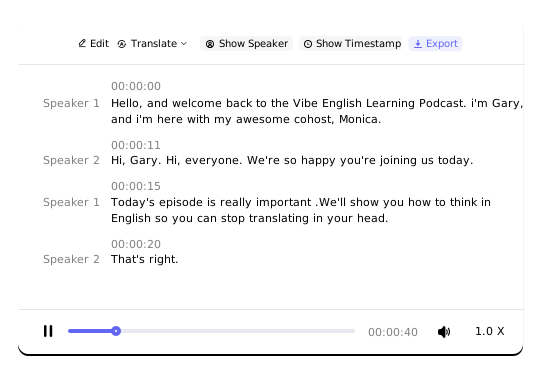
Yes. It supports speaker detection for up to 20 speakers, making it ideal for transcribing interviews, podcasts, and discussions.
How accurate is the transcription tool?
Our accuracy exceeds 96%. It maintains high precision even with various accents or fast speakers, though better audio quality with less background noise improves results.
What features are included in the transcript?
The transcript includes automated speaker identification and timestamps. You can edit the text online or export it for further use.
Can I save my transcription records?
Yes. Simply register an account to save your transcriptions after processing a YouTube link.
Is my data kept private and secure?
Yes. Your videos, transcripts, and files are handled securely—never used to train AI models or shared with third parties.
Can I use transcript content with other AI tools?
Absolutely. You can paste the text into ChatGPT or other AI tools to generate summaries, notes, quizzes, scripts, articles, and more.